English
  Russian
  French
  Italian
  German
  Japanese
  Korean
  Turkish
  Chinese
  Spanish
  Dutch
Dutch 
When purchasing control console desks for your office, you should always buy the one that best fits your working style and space. Here is a list of 10 things to consider when purchasing a control console desk. Understand that these are top 10 tips, not complex rules. That’s because every office is different, and what works for you may not work for others.

- 1. Choose U-Shaped Console Desks
- 2. Provide the Right Amount of Space
- 3. Ensure the Desks are Stationary
- 4. Look for Sturdy Materials
- 5. Don't Waste space
- 6. Consider the Angle of Use
- 7. Choose a Desk With Legs
- 8. Think About Cable Management
- 9. Look for Customisation Options
- 10. Consider High-Density Storage Solutions
- Conclusion
1. Choose U-Shaped Console Desks
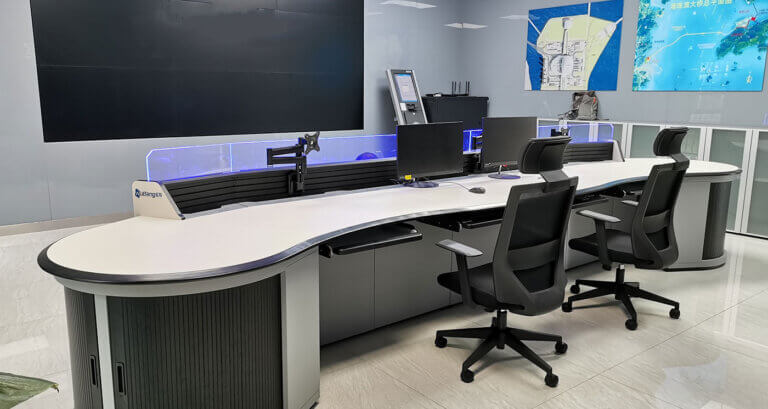
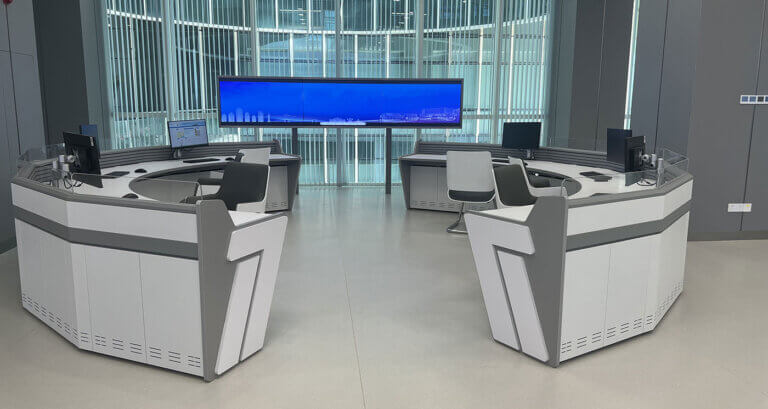
The U-shaped desk is an excellent choice for any industrial office space because it maximizes your workspace and provides plenty of room for all your employees. This type of desk allows you to create separate areas for each employee, giving them privacy while keeping them close together. This makes it easy for employees to communicate with one another while they work, making collaboration easier. The U-shaped desk allows everyone to work on their project without feeling cramped or crowded in a small area.
Another benefit of the U-shaped desk is that you can use it as a meeting table during meetings or presentations, saving you money by not having to buy another piece of furniture for this purpose. The U-shaped desk is versatile enough for many purposes throughout your office or facility.
2. Provide the Right Amount of Space
When designing control console desks for your industrial office workstation, you must consider the space you’ll need.
For example, if you’re working on a large project, you may want to use multiple monitors and keyboards. In this case, ensuring enough room for these items and your monitor stand or arm is essential.
Another example is if you’re going to be sitting for long periods. In this case, it’s best to have a chair with adjustable height settings to find comfort in whatever position is most comfortable for you.
3. Ensure the Desks are Stationary
This means they won’t move or shake while you’re working, which is extremely important when dealing with heavy machinery and equipment.
The best way to do this is by using a large amount of weight-bearing materials. These can be wood or metal, but they should be substantial enough to support the weight of any workstation equipment. You’ll also want to ensure that your industrial office workstations have sound footing, so they don’t slip or slide around when assembled on top of a movable platform.
4. Look for Sturdy Materials
The desk should be able to withstand constant use and not show signs of wear and tear.
You can find many different options for materials for the desk itself, but some are better than others. For example, wood is inexpensive but can splinter over time if used frequently. Metal is more expensive but is durable and easy to clean.
5. Don’t Waste space
Not every inch of your workspace has to be used for the job at hand. But that doesn’t mean you can just leave all that extra space empty. After all, what’s the point of having a control console desk if you’re not going to fill it up with all sorts of equipment?
So here are some tips for maximizing your space:
– Get rid of the unnecessary drawers. Sure, they look nice and all but do you need them? If not, get rid of them! They’re taking up valuable real estate!
– Make sure everything is labeled clearly and in an easy-to-read font so everyone knows where everything goes without asking around whenever they need something out of storage (or use it as a reference point during work).
– If necessary, consider using shelving units instead of cabinets—this will allow you more flexibility in placement and shape while maintaining a professional look overall.
6. Consider the Angle of Use
The angle of use is a term used to describe the angle a user will be sitting at about their desk. The angle of use ranges from 0º (when a user is seated directly in front of their desk) to 90º (when a user is sitting at an angle to the right or left of their desk).
Control consoles should be designed with an optimal angle of use in mind. For example, if you are planning a control console desk for someone who will be using it while they stand up, you should consider having two or three different heights that they can choose from based on how tall they are and how far away they want to place themselves from their monitor.
7. Choose a Desk With Legs
Choosing a desk with legs is essential when designing control console desks for your industrial office workstation.
Why? Because with a leg-based desk, you can customize it to fit your space. If you need to push the desk back farther from the wall, you can use more legs instead of having to add extra support. And if you need to raise or lower your computer monitor, all it takes is moving the legs up or down.
With a pedestal-style desk, it’s much more challenging to make these adjustments—and when you make them, they can be costly and time-consuming.
8. Think About Cable Management
Cable management is a great way to make your control console desk more efficient and ergonomic.
You can use cable management to tidy up the cables that connect your computer, monitors, keyboards, and other equipment, so they are easily accessible.
Besides, make sure your console desk has an extra USB port so that you can plug in your phone charger or any other devices that need charging throughout the day. This will ensure that your electronics stay charged.
This will make your office workstation look more professional and organized.
9. Look for Customisation Options
You have a lot of flexibility regarding the design of your control console desks. You can choose from various styles, sizes, and finishes that will match your specific needs.
This means you can get precisely what you want in terms of form and function. It also helps you save money because you don’t have to worry about buying more than one desk if your original design doesn’t fit the bill.
10. Consider High-Density Storage Solutions
Industrial office workstations that include control consoles must be designed to maximize storage space. The following are some of the considerations:
– Storage should be located near the control console desk to be easily accessible when needed.
– A storage unit should be used to house items used less frequently, such as maps, manuals, and other reference materials.
– Some items may need to be stored in a secure location within or near the industrial office workstation. A lockable cabinet or safe can provide this type of protection for valuable items such as keys, documents, or equipment manuals.
Conclusion
Designing the console desks for industrial office workstations isn’t easy, but it’s not too difficult either. I believe by reading the above 10 tips. You can choose the perfect control console desk for your office workstation.